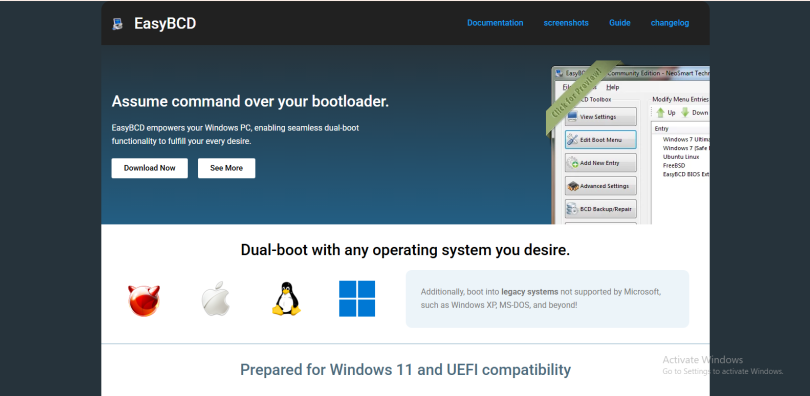

EasyBCD is a popular Windows tool designed to simplify boot management on computers. Many users struggle with dual-boot systems, damaged boot files, or operating system switching because the built-in Windows boot tools can feel complex and technical. EasyBCD solves this problem by providing a user-friendly interface that allows people to control the Windows bootloader without using difficult command-line commands.
Whether someone wants to install multiple operating systems, repair boot issues, or customize the boot menu, EasyBCD makes the process easier and safer. It works by interacting directly with the Windows Boot Configuration Data system, commonly known as BCD. Understanding how EasyBCD works helps users better manage their systems and avoid boot-related problems.
Understanding the Windows Boot Process
To understand how EasyBCD works, it is important to know how the Windows boot process functions. When a computer starts, the BIOS or UEFI firmware checks the hardware and then looks for a bootloader. The bootloader is responsible for loading the operating system.
Modern versions of Windows use a boot management system called Boot Configuration Data. This system stores boot settings, operating system entries, startup parameters, and boot priorities. Instead of editing complicated system files manually, EasyBCD provides a graphical interface that allows users to make changes safely.
The BCD store acts like a database containing information about installed operating systems. Windows reads this data every time the computer starts. EasyBCD edits this database directly while protecting users from making dangerous mistakes.
The Main Purpose of EasyBCD
EasyBCD was created to make boot management simple for everyday users. Without it, changing boot settings often requires command-line tools like BCDEdit, which can be difficult for beginners.
The software allows users to perform several important tasks. It can add or remove operating systems from the boot menu, repair damaged bootloaders, create dual-boot systems, and adjust startup preferences. Instead of typing technical commands, users can complete these actions through simple menus and buttons.
This makes EasyBCD especially useful for people who install multiple operating systems such as Windows, Linux, or older Windows versions on the same computer.
How EasyBCD Interacts with the Bootloader
EasyBCD works by modifying the Boot Configuration Data store. It does not replace the Windows bootloader entirely. Instead, it changes the settings that control how the bootloader behaves.
When a user adds a new operating system entry, EasyBCD creates the proper configuration inside the BCD database. During startup, the Windows boot manager reads this information and displays the available operating systems in the boot menu.
For example, if someone installs both Windows 11 and Linux, EasyBCD can create an entry that allows the computer to launch either operating system during startup. The software handles the technical details automatically, reducing the risk of configuration errors.
EasyBCD can also adjust settings such as default operating systems, boot timeout duration, and boot menu appearance.
Creating Dual-Boot Systems
One of the most popular uses of EasyBCD is creating dual-boot environments. A dual-boot system allows multiple operating systems to exist on the same computer while letting the user choose which one to start.
Normally, setting up a dual boot can be confusing because different operating systems use different bootloaders. Linux systems often use GRUB, while Windows uses the Windows Boot Manager. EasyBCD bridges this gap by helping Windows recognize other operating systems.
When Linux is installed alongside Windows, EasyBCD creates a boot entry that redirects the startup process to the Linux bootloader. This allows users to select Linux directly from the Windows boot menu without complicated manual setup.
The software also supports older operating systems like Windows XP, making it useful for compatibility testing or legacy software environments.
Repairing Boot Problems
Boot issues are common after failed updates, partition changes, or operating system installations. A damaged bootloader can prevent Windows from starting properly. EasyBCD includes repair tools that help restore the boot process.
The software can rebuild missing boot files, repair corrupted BCD entries, and restore the Windows bootloader. These repair features are especially useful when the computer displays startup errors or becomes stuck during boot.
Instead of using recovery commands manually, users can launch EasyBCD and select repair options from the interface. This reduces the complexity of troubleshooting boot-related issues.
In many cases, EasyBCD can restore access to Windows without requiring a full system reinstall.
Managing Boot Menu Entries
EasyBCD gives users complete control over the boot menu. The software allows operating system entries to be renamed, reordered, hidden, or deleted.
For example, a user with several test operating systems may want a cleaner startup menu. EasyBCD makes it easy to remove unnecessary entries or organize them logically.
Users can also change the default operating system that launches automatically after the timeout period expires. The timeout setting itself can be adjusted to display the boot menu for a longer or shorter time.
These customization options help create a more convenient startup experience.
Support for Multiple Operating Systems
EasyBCD supports more than just Windows. It can work with Linux distributions, older Windows versions, BSD systems, and even macOS in certain situations.
This broad compatibility makes it valuable for developers, IT professionals, and technology enthusiasts who frequently test different operating systems.
The software creates chain-loading configurations that allow different bootloaders to cooperate. Instead of replacing one bootloader with another, EasyBCD connects them together through the Windows boot manager.
This approach helps maintain system stability while giving users flexibility in how they organize their operating systems.
Safety and Ease of Use
One reason EasyBCD became popular is its balance between simplicity and advanced functionality. The graphical interface makes boot management accessible even to users with limited technical experience.
At the same time, advanced users can still access detailed configuration settings when needed. The software provides backup options before making major changes, allowing users to restore previous configurations if something goes wrong.
Because boot configuration changes can affect system startup, backups are extremely important. EasyBCD encourages safe editing practices to reduce the risk of accidental boot failures.
Limitations of EasyBCD
Although EasyBCD is powerful, it does have limitations. Some advanced Linux configurations may still require manual GRUB editing. Certain UEFI systems also behave differently depending on motherboard settings and secure boot configurations.
Additionally, incorrect use of boot management tools can still create startup issues if partitions are deleted or system files become corrupted. While EasyBCD simplifies the process, users should still proceed carefully when modifying boot settings.
The software is most effective when used as a management tool rather than a complete replacement for understanding how boot systems work.
Conclusion
EasyBCD works by simplifying the management of the Windows Boot Configuration Data system. Instead of forcing users to edit complex boot files manually, it provides a clear graphical interface for creating dual-boot systems, repairing startup problems, and customizing boot menus.
The software acts as a bridge between users and the Windows bootloader, making advanced boot management far more accessible. Its ability to support multiple operating systems, repair damaged boot configurations, and organize startup options makes it an important utility for both beginners and advanced computer users.
For anyone dealing with multiple operating systems or startup issues, EasyBCD offers a practical and user-friendly solution that reduces complexity while maintaining powerful functionality.